TRS, stereo, balanced audio: What’s with all these connectors?
What is balanced audio and how to deal with it in your audio setup
Bottom line up front
The short answer is your mixer or audio interface probably can’t connect to your headphone output, and you need a Y cable. Why does using your headphone output make it go quiet? Read on.
Phone plugs
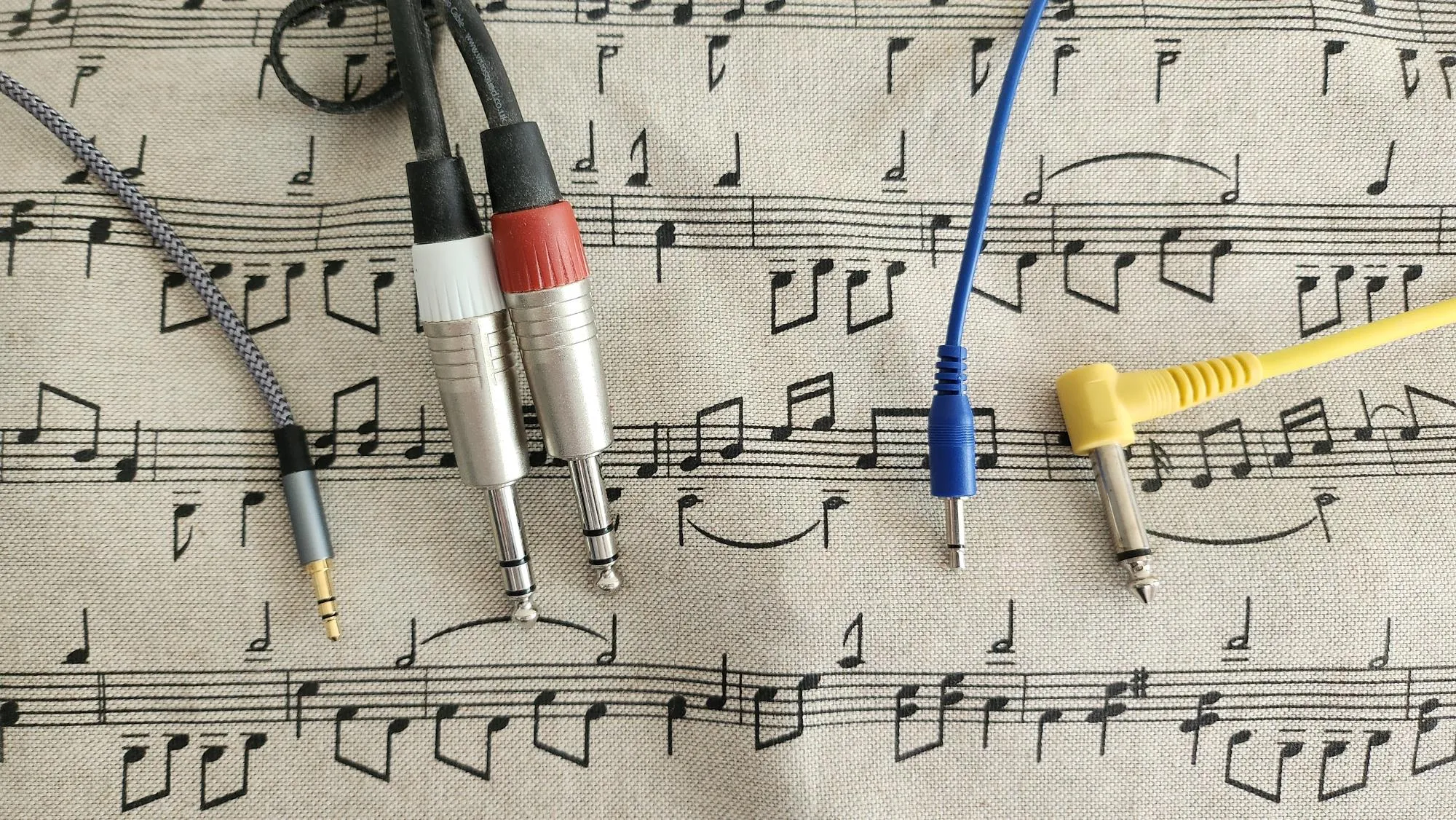
Unless you’re an uncontacted tribe, or a zoomer who never used a cellphone before they stopped putting headphone jacks on them, you’ve probably seen plugs like these. You might have called them ¼″ or ⅛″ jacks, even in a metric country, though they’re also called 6.25 mm and 3.5 mm. But more subtly, there’s two kinds in this photo: some have one black band separating the two conductors, and some have two black bands separating three conductors.
The ones with two conductors are called TS for tip, sleeve; and the three conductors TRS, tip ring sleeve. There are also TRRS plugs (commonly used for phone and radio headsets with a mic and two earpieces), and 2.5 mm variants for smaller gadgets, but the ones in the photo are what you’ll see on pro audio gear.
Stereo vs balanced audio
Lay people will often call the TRS connectors “stereo”, and that’s the source of the confusion. Most consumer gear does use TRS cables for stereo, so the tip has the left channel, the ring has the right channel, and the sleeve is neutral (0 V). But pro audio (instruments, mixers, effects, audio interfaces) usually doesn’t, it’s balanced mono. What’s that?
When you have a long cable run with a low-voltage signal (such as from a mic on-stage to a mixer at the FOH desk), it’s likely to pick up noise from its environment. You can reduce this noise by having two copies of the signal. One copy is inverted (negative when the other is positive), so that when noise hits both conductors in the cable, it’s effectively adding to one copy but subtracting from the other. A transformer in the mixer measures the difference between the copies, so the noise cancels out.
This is why most mixers and audio interfaces have balanced inputs: they’re going to take the difference between those tip and ring signals to cancel out any noise from long cable runs.
So any given TRS cable might be carrying a stereo pair (i.e. a left and a right channel), or it might be two inverted copies of the same signal.
How do I know if it’s stereo or balanced?
| Gear | Connector | Signal |
|---|---|---|
| Headphones | ¼″ or ⅛″ TRS | stereo |
| Guitars and acoustic instrument pickups | ¼″ TS | mono |
| Guitar effects | ¼″ usu. TS | mono (see note) |
| Synths | ¼″ TS or TRS | Check the manual. It might also be labelled “balanced” or “unbalanced” on the back panel. |
| Mixers and audio interfaces | ¼″ TS or TRS | Every ¼″ TRS input will be balanced. Some mixers have one stereo input, usually ⅛″, for a phone or MP3 player. Any channel with an XLR input will be balanced. |
| CV signals (e.g. Eurorack) | ⅛″ TS | always mono TS |
In particular, all of the Korg Volca series except the Sample are mono instruments with only a headphone out, so it’s a stereo TRS output but with the exact same signal on both left and right channels.
What if I mix them up?
There’s a few ways things can get mixed up, depending on what the output is and what the input is expecting.
TS output → stereo TRS input
If the output is (say) a guitar with a mono TS output, then clearly only the tip and the sleeve of the TRS input are going to be getting signal. You’ll hear the guitar on the left side only, and the right side will be silent or have a little noise.
Stereo TRS output → TS input
e.g. you plugged a headphone output into an unbalanced mixer channel. In this case, the ring will just be shorted to 0V, so the mixer will only get the left channel.
Balanced TRS output → stereo TRS input
e.g. you plugged the balanced line-out of your synth into headphones. In this case, the input is “expecting” left and right channels, but you’re giving it two inverted copies of the same signal. In headphones it might seem pretty normal except for the bass sounding phasey or like it’s inside your head. But if you put that on speakers or do any processing downstream, you’ll find the signals are cancelling each other out - just like if you wired one of your speakers with the terminals flipped.
Stereo TRS output → balanced TRS input
This is the most likely messed up case. It happens if you plug a headphone out into a balanced mixer channel. In this case, the mixer is subtracting your left channel from your right channel, so anything panned to the middle will cancel out, anything panned hard left will be normal, and anything panned hard right will be inverted.
TS output → balanced TRS input
e.g. guitar straight into mixer. This is fine, as the mixer’s ring will be touching the sleeve, so it’ll be taking the difference between the signal and 0V. It might be a little more noisy, but probably not enough to notice.
Balanced TRS output → TS input
Again fine, as in this case the ring will be shorted to the sleeve.
How do I fix it?
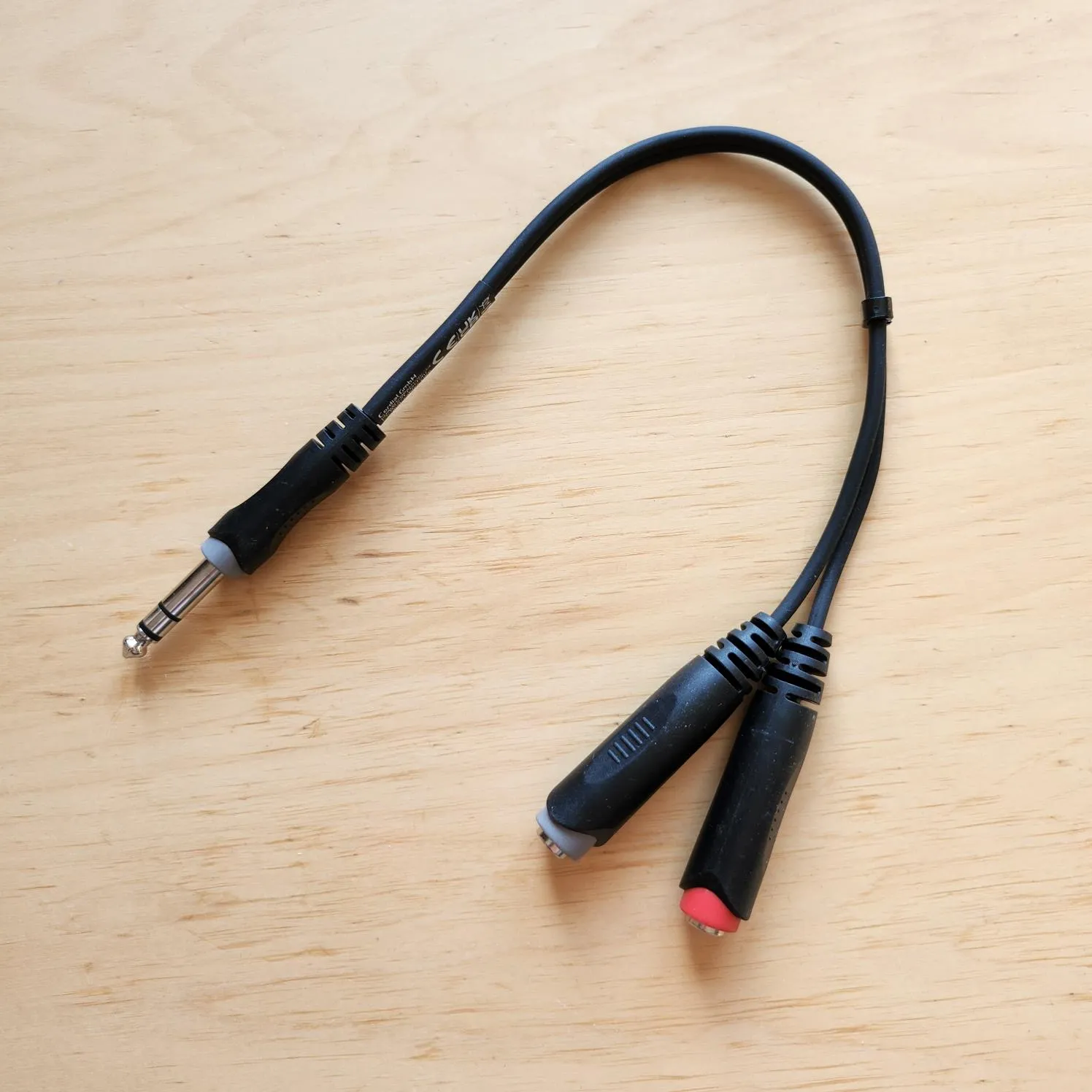
If you have a stereo TRS signal and you want to put it into two channels of a mixer, you’ll need a splitter or Y cable. This has a TRS plug or jack at one end, and two TS sockets plugs or jacks labelled left and right at the other. You’ll need two channels because each individual mixer channel is mono. There isn’t a cable that will downmix your stereo signal to a single mono signal. A few mixers (especially hobbyist ones) do have a dedicated ⅛″ stereo jack for plugging in an MP3 player or similar.
If you have a balanced TRS out and you want to connect it to a stereo TRS input, your best bet is to use the same kind of splitter and only use one of the TS outputs, but then you’ll only get your signal on the left channel.
XLR
XLR always carries balanced audio, because it’s used for mics which typically have very low voltage and long cable runs. It can also have phantom power, where the input (mixer) raises both sides to 48 V, which can energise the mic if it needs it, or power some gadgets like preamps.
If you want to connect your balanced TRS out to an XLR input or vice-versa, you can just get an adapter cable for this. Every combination of male and female is available. Watch your gain staging: line outputs are a lot “hotter” (higher voltage) than mic outputs. A mic plugged into a line input with no preamp will be too quiet, and a line output plugged into a mic input will need to keep the gain quite low to avoid clipping.
Direct
If you only have an unbalanced TS output and you want to connect it to an XLR, you should use a DI box. This has a transformer inside that turns an unbalanced mono signal to a balanced signal (by copying and inverting it). They come in “active” and “passive” variants, where the “active” one can also amplify the signal but needs a battery or phantom power. You can buy stereo DI boxes, but these just have two copies of the circuit in one box: there’s no difference from using two mono DI boxes. In theory you could make a DI box that turns a stereo TRS input into two balanced XLR outputs, but I’ve never seen one on the market.